Here's a Tailwind Button
If you'd like to read about how Tailwind works, click the button below to learn more.
Tailwind DocsWith Tailwind, you'll want to spend a lot of time reading the documentation linked above. You can search through the docs for different properties that you'd like to apply and then try them out in the browser to see how they work. One of the easiest ways to learn about tailwind is to look at other people's html. You can take the following approach to learning from other people's use of tailwind classes.
- Create a new codesandbox and add this link tag within the <head> tag (you can triple click on the html below and it will select the entire link tag. Copy the tag below and paste it within the <head> tag in your new sandbox)
- Use the developer tools to take a look at source code from a site that uses TailwindCSS
- With the elements tab selected, right click on an element, hover over the copy menu option, and select Copy Element.
- Return to the codesandbox and paste the element in there.
- Save the code in your sandbox (cmd/ctrl + S) and you should see the results in the browser on the right half of the screen.
For your reference, here is a list of some of the css classes that we've applied within this sandbox. In parentheses, you'll see the name of the CSS property that the preceding CSS class is designed to affect.
- bg-blue-500 (background-color)
- hover: (prefix)
- text-white (text-color)
- py-2 and px-4 (padding)
- rounded-md (border-radius)
- transition (transition-property)
- duration-200 (transition-duration)
- ease-in-out (transition-timing-function)
- mb-2 (margin-bottom)
An Exercise
Below this paragraph, try to build a button that looks something like this:
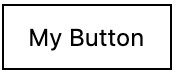
Add a button with type button below and use the class html attribute to apply the appropriate css classes to the button so it looks like the image above.